
Project - Designing Value Groups
118K views
lesson video
Project - Designing Value Groups
courseDrawing BasicsFull course (185 lessons)
$159
assignments 476 submissions
Patrick Bosworth
Don't go chasing waterfalls, please stick to the oceans, rivers, and lakes that you're used to...
LESSON NOTES

Want more? Join the premium course and get full access to all lessons, demos, assignments, and critiques!

Organizing values into strong, connected shapes does three huge things for your drawings.

  • Improves readability: Allows the viewer to understand your drawing at a glance.
  • Adds depth: Well-organized values build a convincing hierarchy of planes.
  • Commands attention: With control over where the eye goes, every accent, texture, and highlight feels deliberate.

Oceans, Lakes, and Rivers

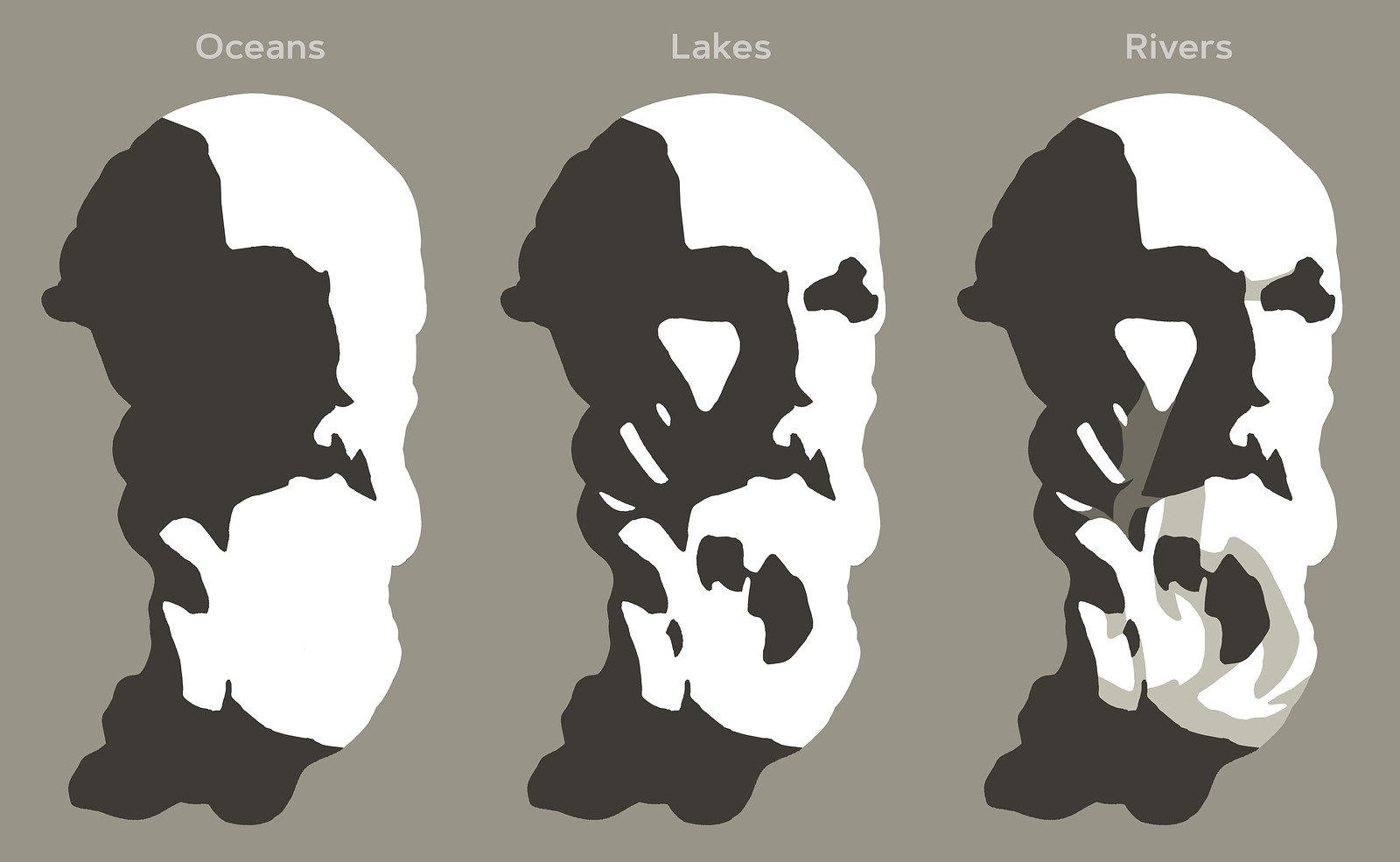
Think of value groups as oceans, lakes, and rivers:

  • Oceans are large areas of light or shadow.
  • Lakes are medium-sized shapes from the opposite value family within an ocean.
  • Rivers are halftone or reflected light connections between lakes and oceans, guiding the flow and gesture in your composition.

Rivers help to tame down distracting lakes and guide the flow in your composition. This approach helps unify your values, grouping them into larger connected shapes.
Balancing 2D Composition and 3D Form

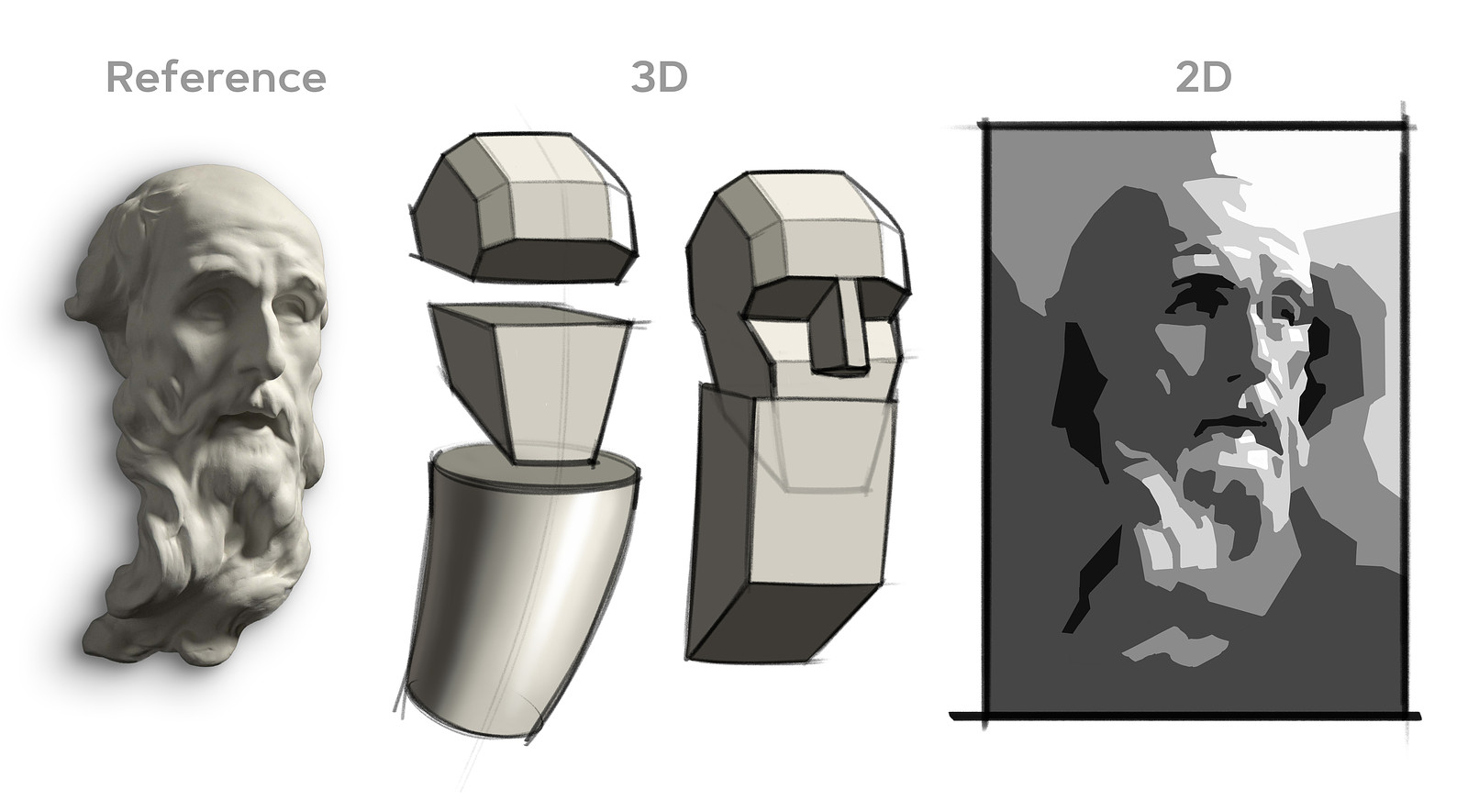
Don't just copy the shapes you see, think like a designer.

  • 2D Composition: Values, their shape, size, and location play a big role in the overall composition and how the eye flows through the drawing.
  • 3D Form: Values reveal planes, a change in value suggests a change in plane.

Every shape you design should enhance both the two-dimensional arrangement and carve out the three-dimensional forms. Sometimes, major plane changes help unify smaller shapes, improving the 2D composition.
Organizing values into strong, connected shapes does three huge things for your drawings:

For example, think of big planes on the forehead or jaw, or simplify the hair and beard into cylinders. Small forms can feel cluttered, but if you let the cylinder's major plane changes influence the values of the small shapes, they work together cohesively.

Dealing with Floaters

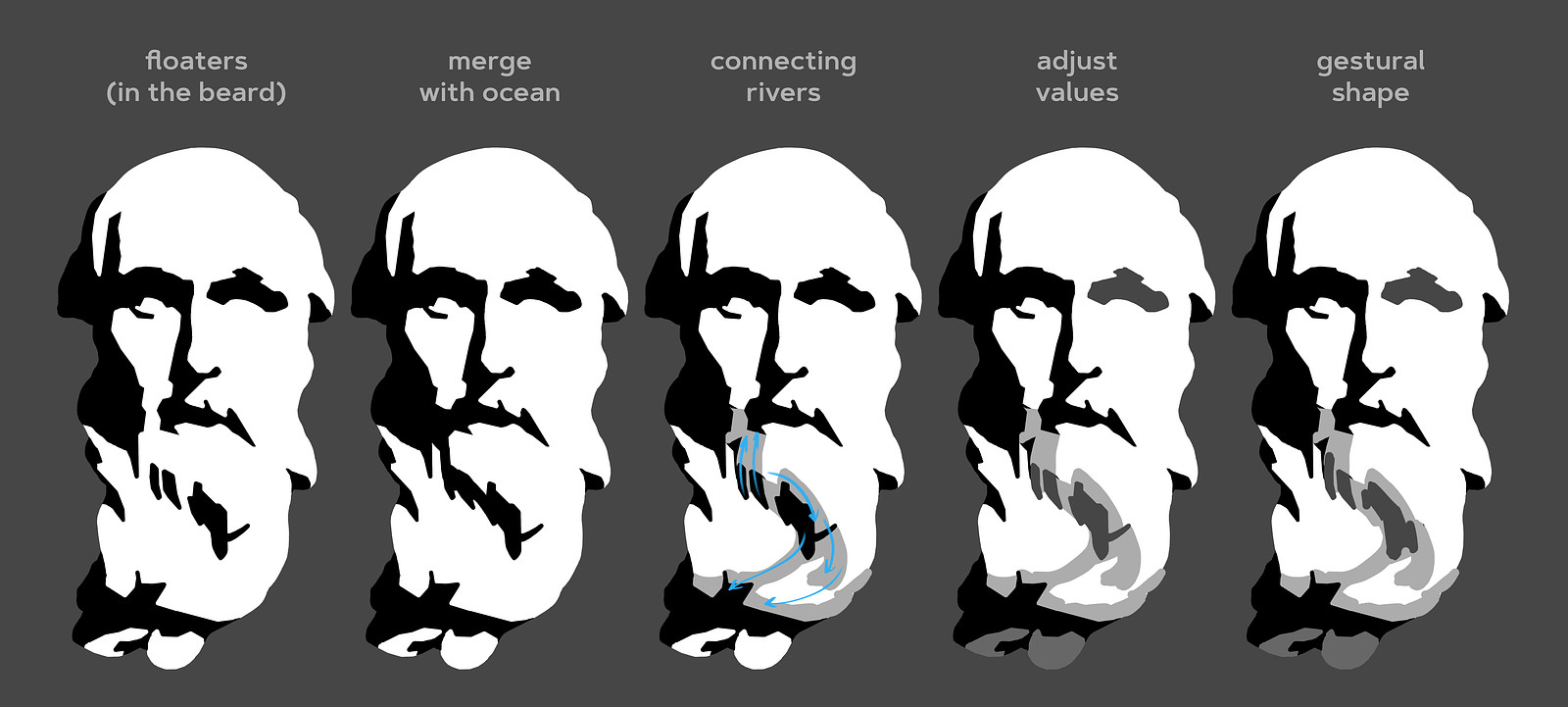
Be aware of how much each shape stands out, based on its value contrast with surrounding shapes. A common rule of thumb is to avoid floaters, isolated shapes, unless they are intended to draw attention.

When you encounter a floating shape that feels distracting:

  • Merge it with the ocean: Modify the shape to make it part of the larger value area.
  • Add connecting rivers: Use halftones to connect a floating lake to an ocean or nearby lakes.
  • Adjust the value: Change the lake's value to make it closer to the surrounding values.
  • Modify the shape's gesture: Alter the shape to flow with the gesture of your composition.
  • Emphasize it intentionally: If you want that shape to stand out, let it be an eye-catching element.

Halftones aren't dark enough to be part of the shadow family, but they are dark enough to create a visual bridge between shapes. Consider the planes of the major 3D form and bring smaller lakes closer to the values of those planes.
Want more? Join the premium course and get full access to all lessons, demos, assignments, and critiques!

DOWNLOADS
jpeg
cast-1-level-1.jpg
204 kB
jpeg
cast-2-level-1.jpg
192 kB
jpeg
cast-3-level-1.jpg
285 kB
jpeg
cast-4-level-1.jpg
227 kB
jpeg
cast-5-level-2.jpg
210 kB
jpeg
cast-6-level-2.jpg
198 kB
jpeg
cast-7-level-2.jpg
2 MB
mp4
project-designing-value-groups.mp4
325 MB
txt
project-designing-value-groups-transcript-english.txt
8 kB
txt
project-designing-value-groups-transcript-spanish.txt
9 kB
file
project-designing-value-groups-captions-english.srt
14 kB
file
project-designing-value-groups-captions-spanish.srt
15 kB
ASSIGNMENTS

Remember when you simplified a pear and a portrait into five values? We're revisiting that concept, but now with more knowledge and experience! You know about shape design, gesture, structure, value organization, and the basic elements of light and shadow.

The main objective is to practice thinking of values as interconnected shapes and be intentional about how these shapes work together. A single thoughtful accent is louder than a bunch of accidental ones.

Level 1

Your assignment is to pick one of the provided photos of a sculpted portrait and create a careful study using values (2 in the shadows, 3 in the lights).

  • Use the Value Tool: Try the value tool to get an initial read of the rough value distributions.
  • Create Thumbnails: Figure out your composition before starting the larger drawing.
  • Work Full-Page: Avoid making it too small to control your lakes and rivers effectively.
  • Start with a Linear Lay-In: Use what you've learned about measuring and eyeballing proportions.
  • Separate Shadow from Light: Clearly distinguish between the shadow and light families.
  • Build Up Values: Gradually add all the other values you see.
  • Avoid Floaters: Allow only important shapes to grab attention.
  • Squint Often: It's the simplest way to see connections and identify distracting floaters.
  • Check Your Work: Flip your drawing upside down or look at it in a mirror to spot issues.

Regarding edges, try not to get too caught up in intricate soft edges and transitions. Feel free to attempt some edge work, but if you find yourself struggling, focus on sharp-edged tiles and concentrate on the value shapes.

Level 2

For those looking for an extra challenge, you can use between 7 and unlimited values. These extra values allow for more subtlety and sophisticated transitions between your shapes. Extra values let you:

  • Model intricate plane changes. You might need more than 2 halftone values plus a highlight.
  • Define shadow all the elements. Sometimes core shadows, reflected light, and occlusion shadows all have distinct values.
  • Create realistic illusions of form with more nuanced rendering. For example a core shadow that changes value as it travels down a form.

Feel free to be more interpretive in how you group values and make bold design decisions. Trust your gut and add your own taste to the drawing.

Deadline - submit by June 13, 2025 for a chance to be in the critique video!

Angelica
9d
This was a big project. I was happy with the first one when I finished it but looking back now, it is really spotty. I think I had a bit too fun picking out lighter values with the eraser… also I think a darker background would have been better. Second one I tried water soluble graphite but I am not good at controlling the brush and water so I got a bit distracted by that. But it did turn out better then the first one but I think the dark value on the cheekbone is a bit distracting. In this two I did’t plan much. I drew the lay in and then designed the shapes within while doing the shading. I struggle doing thumbnails. I tried planning a bit more but then ended up not really referring back to It that much in the end anyway. But I think it at least helped me simplify things a bit better. Also,I need to remember to squint more.
Ash
8d
beautiful work!
Patrick Bosworth
Really great work on all three of these!
Mal
24d
I think I may have lost the plot because I was focusing too much on creating edges in the drawing rather than simply focusing on value groups. Also, I should have taken more time to make sure I had drawn the correct proportions for the drawing. The statue's beard is much shorter in the drawing than in the reference image, thus making it harder for me to place values accurately.
Juan Andres Gonzalez Trejo
My first attempt in about two hours—I started by working on the darker areas first using a medium shade, and then I began adding lighter tones, and I think I added some darker details. But above all, I really liked the idea, and it’s more interesting.
Clément Douziech
Second attempt before watching demo and critics
Clément Douziech
First attempt, many things to correct and that can be better but I'm happy with it. I will do it again a few times before moving on
@gothamdemon
This was also challenging with just simplifying with oceans, lakes and rivers in mind. any feedback welcomed.
Artin A
28d
Open to critique. Thanks.
Artin A
28d
I’m not sure that the values accurately represent the overall volume of the mass. A few things just seem off but I can’t really see it. Maybe I started working on the details too soon before the bigger forms were done. Also I don’t think the core shadows totally make sense. open to any suggestions or ideas.
Applesmapple
my attempt after trying following along with the demo. I'm going to check out what others did with the same cast version and see what i could have done better. I like my shapes but i think there isn't enough contrast, but this angle (cast 2) is also fairly bright compared the other casts, so i'm not so sure. Thank you for this project. going to try it with the other casts
Lane Campbell
I took the drawing i had done two days ago, and rewatched a ton of videos as I was recommended to. I honestly was thinking my drawing was ruined, but it came out much better than I thought it would. Although I'm still wanting to do better, so I'm going to leave this here for now, and move to the edges section of this course. Onve I'm done with that, I'm going to come back and do a second or maybe even third try at this. Really am proud of how i did with this one.
Patrick Bosworth
Great work!! Always push past the first impulse to abandon a piece half way through, you can always save it. Worst case scenario is you experiment, actually ruin it, and have to start over. Most of the time you'll come out on the other side with a really great piece of artwork. You did a great job with this one, you should be proud! Keep it up!
Lane Campbell
did 5 thumbnails with 5 values for each, and ended up liking my last one the best, keeping the face high key, breaking up the dark ocean largely, and connecting it up with mid values. And I really like the bright face against the dark background for that contrast like in the original picture
Lorena Faria
spend at least 10 hours on this level 2 drawing would love some tips and advices
Rich Acosta
Despite my hesitation, I think I was able to get something passable. Definitely need a lot more practice on this though. Probably just going to keep doing these just to get proportions right before I focus too much on shading, but still tried to take a stab at it. Was also more pleased with my thumbnail (in red) than the finished product. I also included some of my attempts from yesterday.
Patrick Bosworth
These are looking really good! I think you captured the unique silhouette of the cranium really well in the red pencil version, but I really like where you're going with the shape design in your second attempt. You're on the right track just gotta trust the process and keep at it! Great work!
Lane Campbell
failed pretty horribly here, but that's just what it takes to get better. Some things I noticed are that my mid tones were simply way too close together, no difference between 2 and 3. also, while making my lay in, the head was a bit too wide and things were a bit off, but honestly I think the lay in still looked really good. I wanted to push the shadow in the cheek bone on the right side, but i don't think it quite worked. There's probably some other things I could work on as well, and I'm probably gonna go back and refresh on the ball shading lesson. Any help is really needed, thanks
Patrick Bosworth
I think the lay in here is really solid! It's clean, and has a nice simplified 3D feel that is ready for values. Great work. Your value shapes are pretty lightly stated at the moment, so I think you can keep working with this and pull a great piece together! You might want to revisit the creating a value scale project, https://www.proko.com/course-lesson/improve-your-drawings-with-values https://www.proko.com/course-lesson/project-value-scales Do a value scale as a warmup for this project, and then try to adjust what you already have shaded here to match the values you establish with your warmup. You can layer right on top of what you already have or use a kneaded eraser to lightly erase, or smudge it back with a stump, or a paper towel, and keep designing your value groups. Think of the first portrait simplification project, fill in each value one step at a time. https://www.proko.com/course-lesson/demo-simplify-portrait-from-observation Also don't forget to do thumbnails for this, work small to problem solve, and then try it at a larger scale when you're ready. The value tool is a great way to experiment with these value groups, so give it a shot while you're thumbnailing. https://www.proko.com/values Hope this helps!
Rich Acosta
I literally just can't do this. I can't even draw a passable face, let alone even begin to think about the shading on this. I feel so demotivated tbh....
Patrick Bosworth
Don't get discouraged, this is a VERY challenging project that relies heavily on the steps that came before it. You might want to revisit some of the other portrait lessons, and try a few more linear lay in's before tackling this one. Portraiture is really tough, so give yourself some grace, and don't give up! Here's a few of the portrait lessons from basics you might want to refresh on, and maybe try again before moving onto the Designing Value Groups project. Hope this helps https://www.proko.com/course-lesson/demo-simplify-portrait-from-observation https://www.proko.com/course-lesson/demo-measure-proportions https://www.proko.com/course-lesson/demo-portraits-in-perspective-level-1 https://www.proko.com/course-lesson/demo-portraits-in-perspective-level-2
Ibrahim Sahibzada
Hello! Would really appreciate some feedback with this one. I did it in 3 sittings of about 30 minutes each. Drew the face first, then drew the shapes on the face and then finally shaded the shapes in. Also, what's the best way to stop smudging a large drawing like this? I kept dragging the high values towards the low value regions 😅
Patrick Bosworth
This is a good start, you have a pretty solid silhouette of the face, and some really great core shadow designs going on, but I think you're jumping ahead a bit. You might want to revisit the Portraits in perspective lesson and work on a clean linear lay in first, https://www.proko.com/course-lesson/project-portraits-in-perspective When you have a solid linear lay in, you can start to more easily separate your light and darks, and design your value groups using the framework of the lay in. Did you do any thumbnails working through your approach? Might help to start small and work through a few sketches first to plan your composition before moving to a larger drawing. When it comes to not smudging your drawing, you can put a clean sheet of printer paper between your palm and the page, and work on top of the clean paper blocking the graphite underneath. A trick Morgan Weistling teaches for charcoal drawing is to hold the pencil in overhand grip, and use your pinky fingernail to maintain contact with the page. This keeps your hand in contact with the surface, but you're not smudging your palm all over the drawing, just lightly gliding over the page with the back of your nail. It takes getting used to, but it really helps to keep your page clean! Keep up the good work!
Carmen Ciumber
These are all level 1 and I want to try the level 2 as well. I find shading much more difficult when the values are on the light side, like the first one below. My approach is to shade the ocean and then spread (smudge) the tone overall and have a base on the entire face. Then i go and shade the lakes and rivers. Also the river thing is not easy.. how do you approach a portait without an "ocean"?
Carmen Ciumber
my level 2 attempts. I can see how important the choices of values are + the blending tool like the paper crayon, in getting the 3D illusion
@al_ic_ja
1mo
I did few attempts but I have a feeling that all of them aren't looking very well. Maybe I should think more about how shapes are connecting to each other and find the rhythms between them.
Wieke Pierhagen
I did level 1 one with photo 3. I went for a pretty contrast rich value scheme after doing some different value thumbnails. I chose to get the sort of inside joke expression and wanted to follow the diagonal lines in the face and beard. I loved the c-curve though it was a bit subtle. The level 2 was with photo 7. This time I wanted to try a more lighter value scheme (as not to repeat myself too much). It took all afternoon! And somewhere in the process I was not checking my value schemes, I was really in a flow. So I had to fix some mistakes ;-) I am wondering how this value scheme project would be if done n tinted paper. Right now I used the white of the paper for the highlights.
Caden Y
2mo
Here's these guys, would love some advice from anybody
Patrick Bosworth
This came out really great! I think your two value design is really successful, great mix of straights and curves in your shape design. I think you could increase the value of your darkest darks, in the mouth, nose, and eye lids to get a bit more contrast in the features, but I think you've done a really nice job with this one! Keep it up!
@hampop
2mo
This was quite fun, but it took quite a while to finish. I decided to draw the cast image 7, because it looked the most interesting to me, even thought it was intended for level 2. I decided to split the values just in 2 and work on connecting individual islands together with rivers. Most of the improvisation went towards the right side of his face which is well lit and has many bright shadowy pockets.
Help!
Browse the FAQs or our more detailed Documentation. If you still need help or to contact us for any reason, drop us a line and we’ll get back to you as soon as possible!