

$159


Bundle discount Each additional course part in your cart adds 3% off all courses, up to 15% off.
Full course
You’ll learn the most important foundational concepts for drawing anything and soon you’ll be drawing pictures out of your imagination or from reference.
$159
Give a gift
Give a gift card for art students to use on anything in the Proko store.
Or gift this course:
Founder of Proko, artist and teacher of drawing, painting, and anatomy. I try to make my lessons fun and ultra packed with information.
comments 1211


Here is my attempt after watching the demo. I used multiple pencils this time and tried to make the shapes more simple than last time. I did forget to shade according to the planes so my pencil strokes are a little bit messy. Now that I am watching the drawing from a screen I notice that I could have given the shirt a light value and that the shading is a bit messy. Feedback is always welcome!
LESSON NOTES![]()
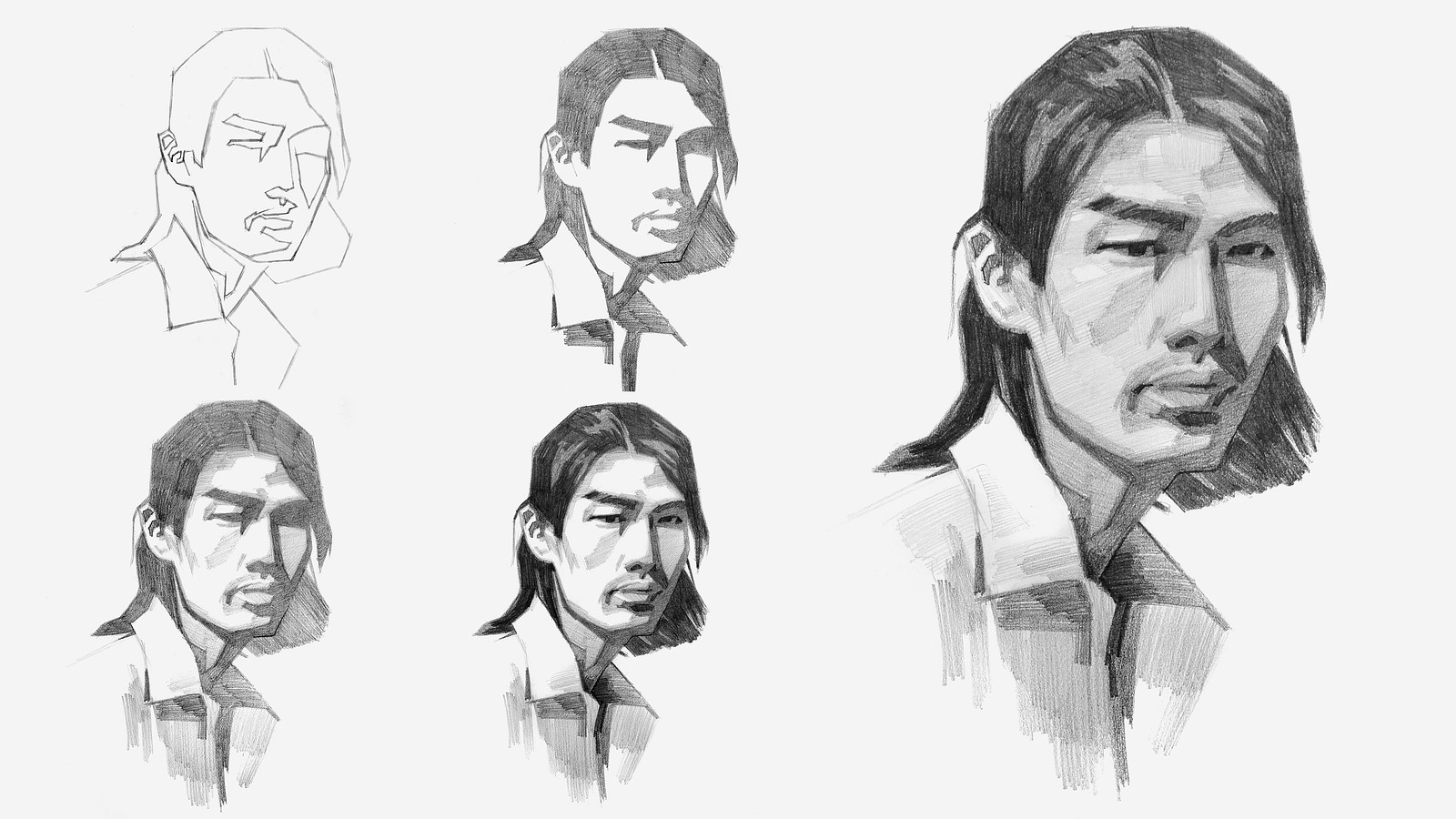
Now that you’ve all had some time to try the first project on your own, you can watch how I do it and figure out what areas you are exceeding and struggling with.
Watch this step-by-step demo on how to properly execute the first project for level 2 students, join the premium course!
DOWNLOADS
simplify-from-observation-portrait-demo.mp4
2 GB
simplify-from-observation-portrait-demo-transcript-english.txt
41 kB
simplify-from-observation-portrait-demo-captions-english.srt
68 kB
simplify-from-observation-portrait-demo-transcript-spanish.txt
42 kB
simplify-from-observation-portrait-demo-captions-spanish.srt
69 kB
COMMENTS![]()
![Stan Prokopenko]()
![]()
![@puppfluff]()
![]()
![Camille Varner Kolafa]()
![]()
![@sage232337]()
![]()
![@helenadraws]()
![]()
![Aroush Rizni]()
![]()
![@pinkbubbles]()
![]()
![Camille Varner Kolafa]()
![]()
![EIL IE]()
![]()
![@juliapicturebooks]()
![]()
![Ash]()
![]()
![@kimzu]()
![]()
![Anca Apalaghiei]()
![]()
![@coffeehater]()
![]()
![@sophialia]()
![]()
![Benjamin]()
![]()
![Anca Apalaghiei]()
![]()
![Melanie Scearce]()
![]()
![Anca Apalaghiei]()


Now that you’ve all had some time to try the first project on your own, you can watch how I do it and figure out what areas you are exceeding and struggling with.
Here is my step-by-step demo on how to properly execute the first project for level 2 students.


•
1d
I think you should try drawing your shapes with firmer lines, and don't get super sketchy with them. Just use straight lines, and don't forget to do the same for the values as well. Practice makes progress!

This is for my simplified portrait assignment. I was honestly on the fence about including the second image because, as you can see, the proportions are way off and it looks kind of funny. But since I put the effort into drawing it, I decided to include it anyway. I’d love to get some feedback so I can improve—portrait drawing is really tough for me (I’ve tried both on paper and digitally)

Watched and re-watched this lesson for too many times, I probably got depleted on energy. I am posting it just to declare the lesson finished and moving on to the mushrooms to refresh. Nevertheless, compared to my drawings from a couple of months ago, there is a significant improvement in line and shape control, so I am not unhappy about it


This is my first time doing something “realistic” as they say- other than the pears ofc lol but I think the guy turned out pretty well for a first portrait try! I will admit I went to hard durning the 4B are so now the eyes are bugging me and the hair is off but I’m pretty happy with how turned out!
Hi thank you so much for this lesson this is before and after I watched this video 😅sorry about the scribbles 😓 the first one is before and the second one is after
•
13d
Great improvement on the 2nd attempt! You're leaning more into the value shapes which is ideal for this assignment. I would suggest bringing in the darkest value in the hair into some areas of the face to balance it out more! Most notably around the eyes, and maybe on the neck.


Thank you so much. I truly enjoyed it, and I feel like my passion has come back and that I’m less lost than I was before.
I learned so much. Although I felt intimidated at first, you are an amazing mentor. Your encouragement and the way you simplify the information make everything feel so much easier.🌸
Thank you! I learned a lot from the demo video. I still find it quite difficult to get the exact value gradations right. At the moment, I’m working with a 0.7 mm mechanical pencil, and I think having a wider range of pencils would definitely help.
I’m also still struggling with keeping my lines and hatching consistent. And I haven’t quite developed an good sense yet of how to choose the direction of my strokes, or how to neatly fill in those small areas around the edges.

•
18d
beautiful work!
These are my drawings before and after watching the demo. I think the proportions are a lot better and I might have improved on the shadow and light separations. Thank you @Camille Varner Kolafa for suggesting the value tool, it was very helpful. Need to work on my pencil work for shading, I tend to get the direction of the strokes mixed up.

I’ve made a second attempt, this time trying to focus more on shapes, values and edges rather than getting caught up in details. I tried some of the studies on a tablet and others with pencil. I’d love some feedback on whether I’m heading in the right direction.
Here is my attempt! The 1st photo is my version after the demo, and the 2nd photo is the version before. I think I improved somewhat after watching the demo, but I still welcome any feedback to improve further.


This is my attempt after/while watching the demo, I am still really off with some forms, but I feel that I have improved in comparison to the first drawing and I feel like I have learned a lot :) it was really fun!


I didn’t pay for the course, but I snatched a screenshot of the pear from the next video. I did this in maybe 10 mins. I have never drawn or sketched in my life, and I am pretty proud of this. I used a mechanical pencil, and my brother happened to have some kind of charcoal smoother pencil thingy around. I am quite proud of myself. :)
Hi everyone! I’d love some feedback on these, especially on my edges and values and what I could improve. I feel like I still have a lot to work on when it comes to anatomy and proportions as well.
I’ve also included a photo of the pencils and paper I’m using, since I’m having some trouble with smudging and I’m not sure if it’s my technique or the materials.
Thanks! :)

•
29d
Hello! These drawings look great. You seem to have the right idea and understand the concept of designing simplified value shapes that represent plane changes on an object. One small critique I have is that some of your shapes, particularly in the lighter value range, aren't as well defined as the darker value shapes. They feel more like render than simplified shapes, making it challenging to judge them as shapes in the context of the assignment. I think I notice this the most in the portrait, so I'm excited to see your second attempt with that one.
It looks like your paper has some tooth to it, which gives it that texture and might be making it difficult to smudge. I like using printer paper for sketching with pencil, it's cheap. readily available and really smooth. If you're trying to smudge with your fingers instead of a blending stump, the oils on your fingertip might be getting in the way as well.
After watching the tutorial, I’m also thinking about reworking the portrait, as I feel like I could improve it quite a bit now that I have a better understanding of the process :)


