January Proko Challenge - Landscape Thumbnails with Tiffanie Mang
10K views
lesson article
January Proko Challenge - Landscape Thumbnails with Tiffanie Mang
assignments 52
Tiffanie Mang
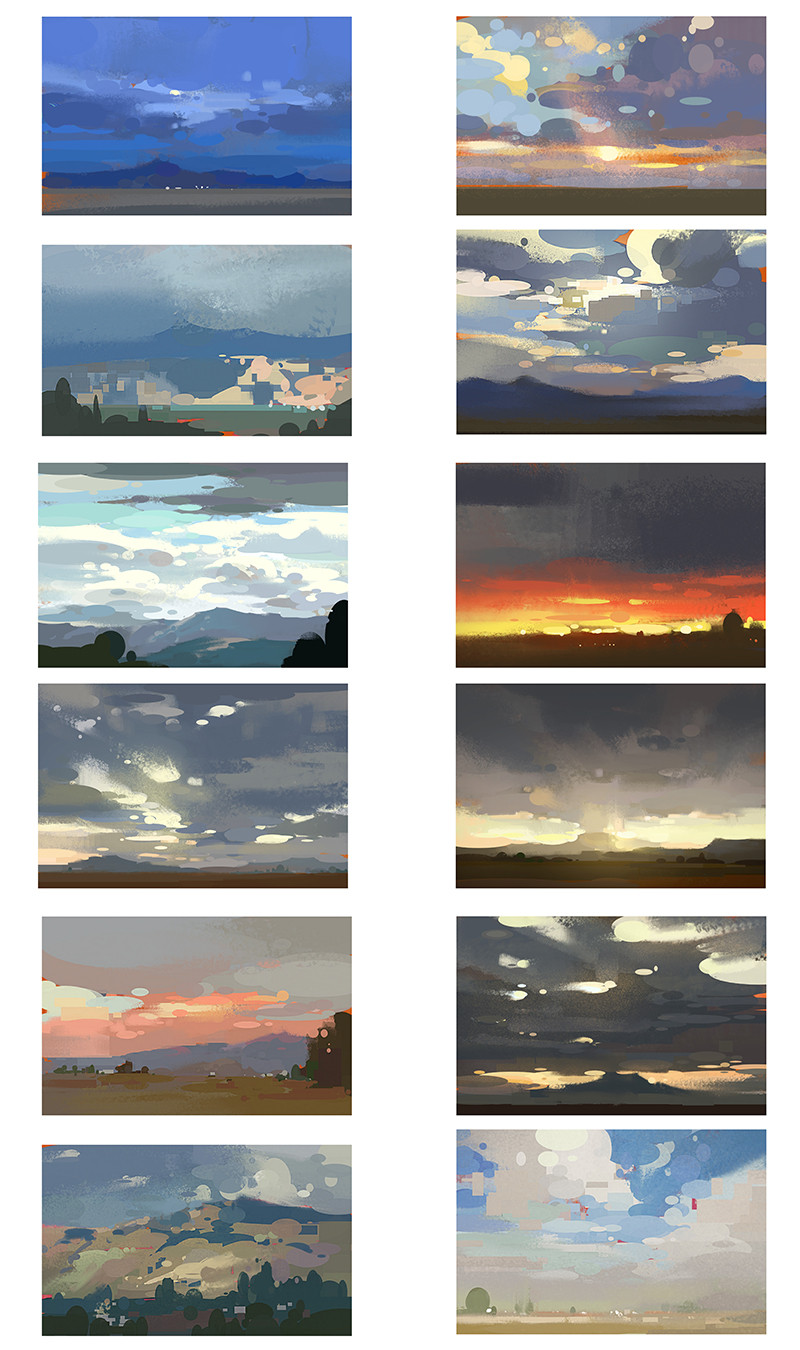
Hey everyone! For those of you who are wondering how to create thumbnails in either digital or traditional mediums, I'm here to share some tips on how you can tackle this challenge! I know it can be daunting painting on such a small 2"x2" canvas. However, if you do enough of these, like I did 100 in April 2020 for PleinApril, I PROMISE you will learn a lot ( I know I did!). Here are my top three favorite revelations you can learn from doing thumbnails: 1) You learn how to see the bigger picture and SIMPLIFY. Often times we get bogged down with details too fast. Working in thumbnails will not let you get all the details you think you need because you simply can't fit so much in such a small surface area! You learn to squint, simplify, and group when needed, three of the most valuable reminders I tell students all the time. 2) You learn to paint more efficiently; because you have less space to cover, it doesn't mean you can just slap on colors carelessly. In fact it's the opposite. Doing thumbnails takes analyzing your photo reference and dissecting the design to figure out what the biggest masses/ main shapes you need to tackle are, and what your overall ratio of light and shadow is. 3) Doing thumbnails are a great precursor to help you figure out the design in your larger painting. If you've done a good job figuring out the main points of your painting and distilling it in your thumbnail, it will serve as great roadmap for your larger painting when you are stuck. For traditional ( regardless of whatever medium you are working in): -My recommendations for working in a 1" flat brush is simply because it prevents you from canoodling in detail. Often times what I find is that when people use a tiny brush, they start stippling in detail, thus losing site of the big picture. This is just my recommendation of course; it is not a requirement. -I like to start off with a light pen sketch. No detail or shading, just lines and contours. I like to use a red LePen, because if it bleeds, it bleeds a nice warm color that often times helps my painting. (versus a sharpie, or black pen.) -I personally like to start off by toning my canvas with a light light wash of yellow ochre. This helps me bring some warmth into the picture from the get go. (You might want to be careful with watercolor, which depends on the white of the paper for your lightest lights!). -From then, I personally like to paint my darker masses first, whether they be cliffs, rocks, tree masses, you name it. If I plan correctly, I can leave some of the tone underneath, and it can effectively serve as the light side of the subject matter I'm tackling, like a rock. AND, if you control and design your shapes correctly, you have effectively painted a picture in perhaps 50 strokes or less. -Keep your subject matter simple! Complicated doesn't always mean better. Readability is what counts. -Always make sure to squint and check if your value structure is working. You can take a picture and turn it black and white on Photoshop or a photo editing app to check. Another tip I have is limiting yourself to 4 -6 colors, the primaries and white. What I like to use: permanent white yellow ochre lemon yellow cadmium red alizarin crimson ultramarine cobalt blue My super stripped down palette: Permanent white lemon yellow alizarin crimson ultramarine The reason I like to strip it down and why I recommend using just the warm and cool versions of the primaries it is that it's easy to get "muddy" colors when you add too many colors to your palette if you don't know how to control them. You can essentially mix all the colors (secondary, and neutral grays) you need with the primaries and white (and black, but I don't use it!) If you would like to know how I tackle thumbnails in gouache, you can check out two short tutorials I have on youtube: https://www.youtube.com/watch?v=ecqpVO7tgqY https://www.youtube.com/watch?v=WEKTZFK-P_s (sorry for the bad quality of the videos!) You can also watch my live stream with Proko where I demo 4 gouache thumbnails: https://www.youtube.com/watch?v=j7UoonJxRAo&ab_channel=Proko For digital thumbnails: -For digital, what I recommend is that you lock your canvas at a certain zoom, or control yourself from wanting to zoom in. This will help you not focus on the details and on the relationship of shapes you are putting down. -For my digital thumbnails, I have developed a certain technique where I use the circle and rectangle line tool, the default hard brush (with a taper), and smudge brush. This limitation of tools really helps me focus on the values of the colors I'm putting down, and if my shapes I put down work well to describe the subject matter. ** (I will post a demo on this soon!) -For digital thumbnails. I also like to tone my canvas first with a solid burnt sienna bucket fill. You can add some texture if you wish, but I wouldn't recommend getting too carried away. -Another technique I like to do is paint my painting all in one layer, just like I would when painting traditionally. This forces you to really problem solve, and not rely on control z or the cushion of layers. This is also simply because I hate dealing with multiple layers (Marco Bucci does this too!) If you want to see how I tackle thumbnails, feel free to watch my hour long tutorial on my Youtube, where I painted digital thumbnails on Infinite Painter: -Small is the New Big (workshop with Infinite Painter) https://www.youtube.com/watch?v=5TjSVOGUqyA If you wish to download the template that I used, click below!: Thumbnail Template: https://www.infinitestudio.art/painter/get.php?file=Thumbnails-Template.pntr You can also download my brush pack I used for Infinite Painter: Tiffanie’s Core Essentials Brush Pack https://www.infinitestudio.art/painter/get.php?file=Tiffanies-Core-Essentials.przp And last but not least, please download my FREE PDF- 7 Foolproof Steps to a Better Painting. I hope it will help you with the challenge! https://drive.google.com/file/d/1xUNPcU3i9C9wh7yhEX7MASbnH1S4hUdU/view?usp=sharing
LESSON NOTES

Create Dreamy Landscape Thumbnails

Prompt

We're starting the year off right with a challenge judged by  illustrator, plein air artist, and landscape artist, Tiffanie Mang! You might recognize her stunning landscape paintings, and now it's time to try your hand at making some landscape thumbnails of your own. Using any traditional or digital medium, or a combination of both, create 5 2"x2" landscape thumbnails! Tiffanie will judge entries based on ability to simplify,  readability and design, color choice, quality as a group, and storytelling.

Medium: Traditional, Digital, or a combo of both. Please include reference photos used. I would suggest only using the circle and square U tool, hard brush with no opacity, and one smudge brush on if using Photoshop, and for gouache only using a 3/4"-1" brush and 1 round brush size 12 for your 2"x2" thumbnails.

Sponsored by Wacom, Sentient Academy,  Vision X Live Conference, Trekell, Canvy and Proko.

This challenge is closed for new submissions. 

Congrats to all the winners!

View all submissions
View reaction video
View all winners


proko-challenge-sponsors

Prizes

Winners will be contacted via the email on their Proko.com account.

Tiffanie Mang will pick 1st, 2nd, and 3rd place based on readability and design, color choice, quality as a group, and story telling.

Prizes

Winners will be contacted via the email on their Proko.com account.

1st Place

Wacom One Creative Pen Display
1 year access to Sentient Academy
Vision X Replay Pass
1 year Canvy subscription
Proko Figure, Portrait, and Anatomy courses

2nd Place

Wacom Intuos Small Bluetooth
Vision X Replay Pass
2 Proko courses of your choice

3rd Place

One by Wacom Pen Tablet
Vision X Replay Pass
1 Proko course of your choice

Community Choice

$250 Proko Gift Card - YOU get to choose a winner by upvoting your favorite submissions!

Proko Team Choice

$250 Proko Gift Card - The Proko team will vote on their favorite.

Skelly's Choice

Proko Skull - Skelly will choose his favorite.

Proko Impromptu Awards

10 impromptu winners will receive:

1 Proko Course of your choice

Wacom Random Winner

To give students a higher chance of winning, Wacom is awarding a random participant a Wacom Intuos small tablet.

Shipping Restrictions

Free shipping of Wacom prizes to US, Canada, Latin America (except Venezuela), EU, UK, Japan, and Australia. Participants in all other countries would pay shipping costs to claim a tablet.

Participants in all other countries would pay shipping costs to claim prizes.

COVID-19 Alert Shipping to certain countries will not be possible right now because of the pandemic. Please be aware of an indefinite delay for shipping prizes to winners outside of the United States.

ASSIGNMENTS

Works in Progress

Post your process sketches and works in progress for the challenge here if you want feedback from the community.

This challenge is closed for new submissions.

Now it's time to VOTE! One of the prizes is a Community Choice, so it's up to you to scroll through and UPVOTE your favorite submissions in the final submissions thread. You can upvote as many or as few as you'd like.

Voting will stay open until February 1st 11:59pm PST. All the winners will be announced later in February. Good luck to everyone and thank you for all the amazing entries!

---

UPDATE: Winners have been announced!

Moyra Le Blanc Smith
Hi - I wondered if this challenge has been judged yet? Maybe I missed the email? I'm interested to see the video and the results.
Andrea Taipe
Thanks for the challenge! I love it! These are my submissions. I had a good time and learned new stuff. I tried my best. All references were taken by myself. Greetings from Ecuador! ^-^
Mary Beth Bellon
HI, Round two....using my own photos, M Graham Gouache, on cut 2x2 cresent board. This time I used more of my larger brushes attempting to use sweeping strokes. Un-edited paintings.
@jameschapman
Hi, these are my submissions, I enjoyed drawing them and pushing my limits with different brushes and textures. I hope that you like them
Mary Beth Bellon
HI, With temperatures in the low teens with some days dipping into the negatives, I took photos of Geneva Lake from the shoreline. Painting from my ipad I used a variety of brushes with M Graham Gouache. Working small intrigued me. I learned more about my paints without having to labor over a larger painting. I will contuinue this as part of a Plein Air practice -- looking forward to seeing how I can work this small outdoors. I had trouble with the uploads cropping my images, I photographed them in a line to show full images, I know it's not optimal, if anyone has ideas let me know. I'm using a light ring partnered with an old iPhone. Tomorrow before the deadline I will see what I can do in photoshop as these images are unedited. I hope to be posting more in hte future .
@inez
4yr
Hi! Wow this was so much fun! It was years ago that I painted. So I got myself the basic colours of gouache and a some large brushes and got started on some landscapes from the Ialian Alps. Certainly a challenge, especially with the large brushes and the thumbnail size. But I had such a good time! I learned while painting, mixing the colours and getting to handle the brushes to bring in smaller details. I tried to paint these landscapes in the same athmosphere.
Mary Beth Bellon
Hi Inez, I like that you taped off the 2x2 on watercolor paper. I can give you my humble thoughts as Im far from being an expert. The first image is my favorite, I like that the house is partially covered , hidden by the greenery. I think its a successful compostiton and painting. Lots of interesting images that you compiled from the two different photo references that help to move the eye around.
Anup Rimal
4yr
Managed to do quite a few and submitted only 5 out of 28. This was fun, feel like I got better as I went on.
Tomek Kowalczuk
Here's my sumbission. I was using Photoshop and reference images from my private gallery
Oliwia Kozłowska
ahhhhh love this brushwork and a more traditional feel even though its digital! great thumbnails
Mary Beth Bellon
Love your brush workwith the simplicity of strokes Very cool... skill.
Hazel Anderson
wow these are amazing!! 😮 I love the way you simplified these
Ananya Dey
4yr
First time doing an online and digital painting challenge. Thank you for giving opportunity to showcase our work
@nilankur
4yr
here's my five based on mountains and river! digital on krita. I took the ref photos. Feel like the style has changed a bit from the first one (which is the third one in the order which i have uploaded here) to the last one (which is the first one :') sorry! ). Wondering if i should do a couple more! Plz give me thoughts/opinions/criticism!
Mohammed Alnajdi
I never done this before. Honestly I have no idea how to approach this.
Giacomo Sardelli
These are all my 20 attempts for this challenge. I was about to pick the best 5 of them, but it is my understanding by reading some comments that we are now allowed to post more than 5. The lesson notes say that we are supposed to submit 5 thumbnails, so I'm quite confused about the official submission request for this challenge. Anyway I hope you'll find these thumbnails interesting: a couple of them are duplicates because they didn't turn out as I wanted and I repainted them, they might be useful for who is stuck where I was!
JOSHUA ELEK
It’s my understanding that you are supposed to do as many studies as you want, and paint (or pick) five for the final submission. This page is for posting in-progress images, in order to get feedback from the community. The five thumbnails that you want to have considered for the contest should be posted in the final submissions thread. (Link above.) I reread your post, and I think you knew this, but I’ll post my response here any way, in case it clarifies something for someone else.
JOSHUA ELEK
Tomorrow, I will iterate on one of these for my third thumbnail, any suggestions on which one I should pursue?
Mike Crean
4yr
i see you made them already but 14 is fire
@jballay
4yr
JOSHUA ELEK
I love the way your high key colors capture the bright summery mood of these landscapes!
@kitkitkit
4yr
5-ую еще отправлю я здесь первый раз
@kitkitkit
4yr
@kitkitkit
4yr
JOSHUA ELEK
I love these. I struggle so much with clouds, and you really managed to capture the volume and reflective light in these thumbnails.
@xtrixart
4yr
Hello! Are there rules regarding what references are allowed? Could this challenge be used an opportunity to do studies of movie stills, animated frames etc?
Zoungy Kligge
I updated my digital versions of the landscape thumbnails, with stronger contrast and chroma and resolution. I tried to keep very loose and work fast on this set without overthinking. All were done in one sitting from observation as the sun was setting at my house, and then updated from memory in a second sitting. It would be interesting to return to gouache on a third set. What do you think?
JOSHUA ELEK
Man, the lighting in the first one is mesmerizing. I just love the way those trees in the back ground shine like fireflies. And the way you reduced contrast and muted the colors in the foreground really makes it feel like dawn/dusk.
Donnie Lindsey
My first 5 attempts of 2"x2" landscape thumbnails. Photoshop. Reference images I took myself. Except the image on the top right.
Mary Beth Bellon
I agree, the lighting is spot on. They bring emotion to the paintings, i believe more than the stunning photos do, if that make sense.
JOSHUA ELEK
Wow, you really nailed the lighting in these. The second one is difficult for me to interpret without the reference photo, maybe simplifying everything behind the white tree into one shape would help the tree stand out? Not sure. number one is my favorite, and I’m jealous of how well you captured the light on the fourth one. Well done!
@mado
4yr
Hi, I noticed that some persons participate more than once. Can we do that or if we are supposed to present only 5 thumbnails for the whole challenge? Thank you for answering me.
Katey Jensma
You are able to submit multiple entries in groups of 5. Each group of 5 will be judged as one entry.
@mado
4yr
No, I mean in the final submission page, someone participate 4 times. I just want to know if we can do that. Thank you!
Paige
4yr
This particular thread is for posting works in progress rather than submitting finals, if that's what you mean.
Ferencz Erzsebet
My first 6 attempts of 2"x2" landscape thumbnails. Never worked in such small size. These were created with acrylics, which is drying a bit too fast for this kind of work but this is really challenging and very fun. Trying to work on better readability and better contrast/colour combinations. Maybe I will try 1-2 batch with tempera or pastels, and I definitely want to create 1 digital batch too. This challenge is amazing and helps a lot in grouping values, shapes, warm and cool colours, improves colour choice and keeps fit the creative mind. I know, some of the thumbnails doesn't even look like the reference photo :) but if you have time for giving some feedback or any suggestions how could they be improved, they will be very appreciated. Thank you
Help!
Browse the FAQs or our more detailed Documentation. If you still need help or to contact us for any reason, drop us a line and we’ll get back to you as soon as possible!
