

$159


Bundle discount Each additional course part in your cart adds 3% off all courses, up to 15% off.
Full course
You’ll learn the most important foundational concepts for drawing anything and soon you’ll be drawing pictures out of your imagination or from reference.
$159
Give a gift
Give a gift card for art students to use on anything in the Proko store.
Or gift this course:

Founder of Proko, artist and teacher of drawing, painting, and anatomy. I try to make my lessons fun and ultra packed with information.

LESSON NOTES![]()
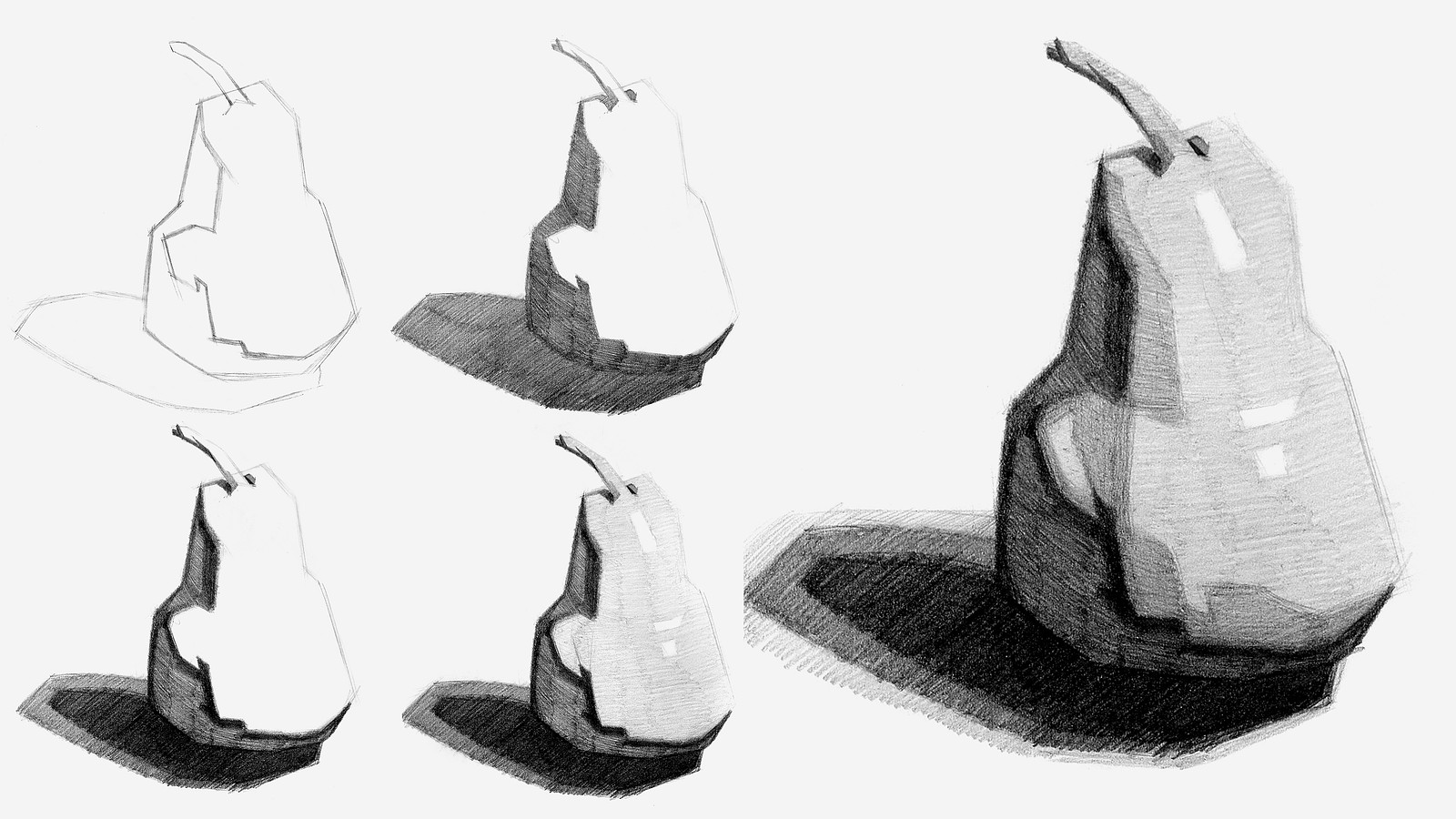
Now that you’ve all had some time to try the first project on your own, you can watch how I do it and figure out what areas you are exceeding and struggling with.
To watch this step-by-step demo on how to properly execute the first project for level 1 students, join the premium course!
DOWNLOADS
simplify-from-observation-pear-demo.mp4
807 MB
simplify-from-observation-pear-demo-transcript-english.txt
24 kB
simplify-from-observation-pear-demo-captions-english.srt
40 kB
simplify-from-observation-pear-demo-transcript-spanish.txt
24 kB
simplify-from-observation-pear-demo-captions-spanish.srt
40 kB
COMMENTS![]()
![Stan Prokopenko]()
![]()
![@kunalsurve]()
![]()
![@kolzac]()
![]()
![Camille Varner Kolafa]()
![]()
![Yun]()
![]()
![Camille Varner Kolafa]()
![]()
![@becky232906]()
![]()
![Camille Varner Kolafa]()
![]()
![@yucki]()
![]()
![Ben K]()
![]()
![Jay C]()
![]()
![Ashwini]()
![]()
![Paninii.445]()
![]()
![Антон Молчанов]()
![]()
![Rorii Evaila]()
![]()
![@phives]()
![]()
![Camille Varner Kolafa]()
![]()
![@marzzz]()
![]()
![Melanie Scearce]()
![]()
![shaun mclellan]()
![]()
![@uncannievalley]()
![]()
![@samjoseph]()
![]()
![Camille Varner Kolafa]()
![]()
![Rachel Exo]()
![]()
![Jeremy Rogers]()
![]()
![Kevin]()
![]()
![Camille Varner Kolafa]()
![]()
![@nora_h]()
![]()
![Camille Varner Kolafa]()


Now that you’ve all had some time to try the first project on your own, you can watch how I do it and figure out what areas you are exceeding and struggling with.
Here is my step-by-step demo on how to properly execute the first project for level 1 students.
Hi everyone! This is my recent value study, and I’m currently learning the fundamentals of drawing.
I would appreciate your feedback


•
2d
I see improvement as well! You might want to try drawing a value box scale somewhere on your page so that you can establish your 5 values, and practice getting the technique down (pen pressure, stroke direction) for them. Your values are better in your 2nd try, but I would suggest getting more even coverage with your strokes so that the values read more clearly :) Great work!

The demo was really helpful, I think my second attempt looks a lot better with the guidance!
•
5d
I definitely see the improvement on your 2nd try! The values read a lot clearer and I can only see 4 values in your first one, but you got that 5th one in on your 2nd attempt .Your shading is also a lot more uniform and less chaotic :) Nice work!
Here is my first attempt at drawing the fruit. Honestly it was so hard and I feel like it looks awful. Not sure what to do to improve it.
•
5d
Nice job! Don't beat yourself up, just remember that any drawing you do is still practice and the fact that you created anything is great! So I think the problem lies in your reference. The lighting is very stark, and doesn't provide much value variation. It's hard to find the "in between" values on it. I would suggest trying the pear image downloads provided on the lesson! They have more shape to them and it's a bit easier to differentiate the values. Also, drawing in a value box scale somewhere on your page can help you establish your 5 values and find what shading technique (amount of pressure, direction of strokes) works best for you. Right now I only see 4 values in your drawing. And lastly, don't forget to use straight lines only; we're just simplifying what we see in this project. Keep up the good work!
Hi everyone!
My name is Yucki, and I’ve recently started the Proko drawing course. I’m really enjoying it so far and having a lot of fun learning and improving my drawing skills.
Here’s my first drawing of a pear! 🍐 I’m looking forward to learning more and seeing everyone else’s work.
Happy drawing!
Yucki ✏️

•
6d
Welcome, Yucki! I'm happy to see your passion and excitement for drawing! Nice work on your pear, you captures the planes very nicely and the values look great! All I could note is that for this project a dark outline isn't needed, and that outside edge of the pear should be the same as the value it contains! Great work! :)


Hello Everyone!
I am completely Newbie and trying to learn drawing!
I am posting my trial after demo!
Enjoying it a lot
Hello Everyone!
I am a beginner and trying to learn drawing. I have added my attempt before demo and after demo.


First assignment done! Pear 1 and 2. I always thought drawing fruit seemed boring, but it's an amazing exercise to get your values mapped out :)

Third try... honestly, I’m prouder of finally posting something to the community than of the drawing itself haha


Feel like the one I created without the demonstration looks more like a pear.. I’ll do it again though.
This was fun. I spent a long time trying to get the pear outline just right then didn't leave enough room for the shadow, whoops! I also had a hard time getting the shading even.
•
10d
Try drawing in a value box scale! It will help establish your 5 values, and practice how much pressure is needed for each one as well as that even coverage you're looking for.
I feel like I've done better with my values since my last attempt (doing the value chart helped). However, for some reason my proportions are worse this time around, in my last attempt I felt like I accurately portrayed the bend in the pear, but with this recent attempt no matter how much I tinkered (I spent about as long on just the outline for this attempt as I did for the entirety of my previous attempt) I could not get the shape accurate enough. This is a common phenomenon with my art, whenever I try to refine a drawing I always end up with a more improperly proportioned piece! Is this normal? What could I be doing wrong? Advice and critique is very welcome :)

•
12d
Very normal, especially when you're learning new concepts, or deepening your understanding of a concept. Think of it like the task manager on your computer- when you're running a big program, it takes up most of the processing power and makes the rest of the programs run slower or stall. Simplifying on it's own is a difficult process, combined with eyeballing accurate proportions, pencil control for shading and good lines, it's a lot to juggle! As you practice each component, develop skills and muscle memory, you'll be able to 'run' them simultaneously.
Overworking a drawing can result in inaccuracy too. Sometimes it's better to spend less time and do multiple separate iterations than try to tweak one drawing for a long time to get it right.

I did the only fresh produce I had, a Jalapeno :D Now I'll watch the demo and do a pear

I think I improved on 5 distinct values and where they were and with my proportions. I think I didn’t do as well or possible did worse trying to delineate between the values and definitely in creating even shading
•
13d
Looking good! Don't forget to keep all of your edges in straight lines, looks like you rounded the pear contour some!
I attempted one before watching the video and one after. I have no formal drawing experience or instruction other than the free videos. Looking forward to getting better.

after looking through the images after taking a picture, I can see a few things I want to improve on. I believe I can work on the shapes of the values a little more. The more I work on them the more it becomes kind of a straight line and loses the feel of the planes of the fruit. I also think I can darken my dark halftones a little more throughout. I do like that the fruit does feel blocky and simple, looking forward to doing more!

This is my best attempt after the critique. I think I will need to work a little bit more on the values of the shadows.
•
16d
Have you tried drawing in a value box scale somewhere on your page? That might help! I think it could benefit from a value that is between your 2nd lightest and the value next to that. I also think the lines on the outer edge of the right side of the pear are too light. That side of the pear blends in with the background shade you have. Keep up the good work!
This is my second attempt, this time after watching the demo. Maybe I'm being a bit shy with the shadows and sharp edges here ;-)
•
16d
I agree, I do think you could use sharper edges in the left side darker values, including the drop shadow (and don't forget to use straight lines for that one too). Great work though!
